


本章概要
1. 配置计算机substrate开发环境
2. 使用官方节点模板工程来运行一条基于substrate的区块链
3. 使用一个前端模板工程来与substrate链进行交互
环境依赖:
Substrate开发环境(基于unix计算机,如Linux,MacOS)
官网上的安装代码会出现一个bug,即安装的源码一致,编译工具版本一致,但是最后编译出现问题。原因是cargo下载的package没有成功checkout到对应版本的代码。这里如果之前已经安装了相关的rust工具链条,需要先行卸载:
rustup self uninstall
卸载完毕之后运行:
curl --proto '=https' --tlsv1.2 -sSf
https://sh.rustup.rs | sh
安装特定版本的rust工具链:
rustup toolchain list
rustup uninstall stable
rustup install 1.46.0
rustup default
1.46.0-x86_64-unknown-linux-gnu
rustup toolchain install nightly-2020-09-30
rustup target add wasm32-unknown-unknown
--toolchain nightly-2020-09-30
编译substrate节点模板工程
1.从github上clone节点模板工程(2.0版本)
git clone -b v2.0.0 --depth 1 [https://github.com/substrate-developer-hub/substrate-node-template](https://github.com/substrate-developer-hub/substrate-node-template)
2.初始化WebAssembly构建环境
Load settings into the current shell
script if you can't use rustup command
If you've run this before, you don't need to run it again. But doing so is harmless.
source ~/.cargo/env
3.编译节点模板
cd substrate-node-template
cargo build –release
编译时间取决于所用的硬件配置,大概会需要10分钟左右。
安装前端模板
官网教程使用一个基于ReactJS的前端模板,使用这个前端可以与基于substrate的区块链节点进行交互,未来也可以使用这个前端模板给自己的项目创建一个UI界面。
为使用这个模板,需要安装两个工具Yarn和Node.js(Yarn的依赖),如果之前没有安装这些工具,可以从各自的官网中进行安装:
安装Node.js
[https://nodejs.org/en/download/](https://nodejs.org/en/download/)
安装Yarn
[https://classic.yarnpkg.com/en/docs/install/#debian-stable]!(https://classic.yarnpkg.com/en/docs/install/#debian-stable)
安装完毕之后,就可以配置前端的环境了:
Clone the code from github
git clone -b v2.0.0 --depth 1
https://github.com/substrate-developer-hub/substrate-front-end-template
Install the dependencies
cd substrate-front-end-template
yarn install
运行节点
使用以下命令启动节点(必须要在substrate-node-template/目录内)
Run a temporary node in development mode
./target/release/node-template --dev –tmp
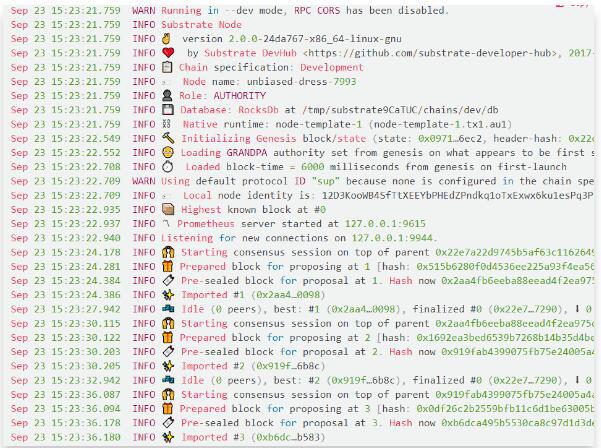
启动之后可以看到类似以下的结果,即表示已经成功完成节点启动:
启动前端:
为了与本地节点交互,还需要使用刚刚clone的前端节点,在之前已经安装了该前端模板,在这里可以通过以下代码将其启动(必须在substrate-front-end-template/目录内):
Make sure to run this command in the root
directory of the Front-End Template
yarn start
交互
一旦前端启动之后,程序会自动在浏览器弹出窗口,地址是http://localhost:8000/,此时即可进行与本地节点的各种交互了。
还有一种方法可以绕过前端节点的环境搭建和运行,即使用官方给的浏览器前端网址:
https://polkadot.js.org/apps/#/explorer
进入之后,点击左上角
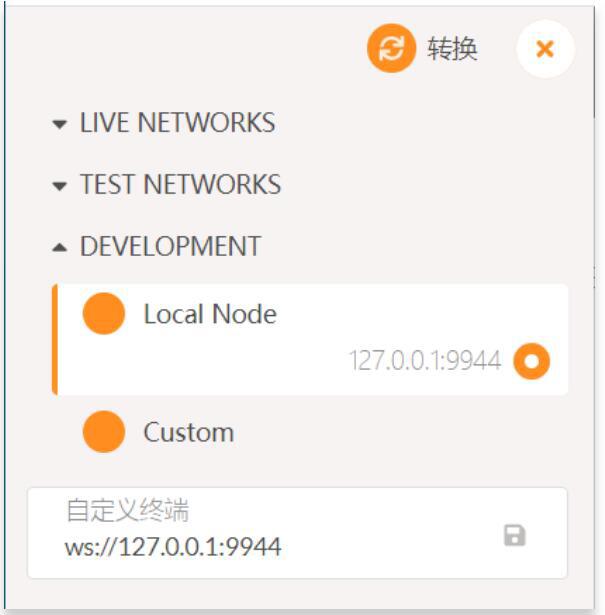
选择Local Node,点击上方的转换,即可与本地节点进行连接,实现交互!
关键词:substratesubstrate2.0
 jay
jayATFX任命LineHoYoungPeteri为全球战略合作副总裁,推动全球合作伙伴网络扩张
Ripple收购加拿大稳定币支付平台Rail,推动全球稳定币支付创新
Webull合并旗下Webull Pay推动加密交易重启,预示美国市场第三季度开放新机遇
渣打银行任命Noelle Eder为科技与运营主管:加速全球数字化转型
Coincheck完成收购Next Finance Tech:强化区块链基础设施与 staking 服务
BX Digital获FINMA首张DLT交易许可:区块链驱动下的瑞士金融新篇章
21X任命Philip Filhol为高级业务发展经理:欧洲首家区块链交易所蓄势待发
区块链初创公司Flowcarbon推出碳抵消NFT项目Flow3rs
日本移动电话运营商NTT Docomo将向Web3投资40亿美元
Binance收购FTX可能会引起监管机构的反垄断调查
Astar创始人:日本最大移动运营商NTT DoCoMo计划投入超5000亿日元开发Web3基础设施
Azuki和日本街头服饰品牌 AMBUSH®︎合作推出限量版时装
农业区块链软件即服务初创公司Assert AI完成200万美元融资,Quona Capital等参投
Chainlink与MVGX合作探索加密碳交易
国际食品巨头Orbitel推出新的Boba Man NFT
横琴粤澳深度合作区布支持元宇宙产业发展十方面税收措施
蚂蚁链开发者实验室推出开发者数字头像
国新办发布《携手构建网络空间命运共同体》白皮书:对区块链等新技术加强管理
音乐游戏开发商Blockstars完成500万美元融资,Future Fund领投
Circle将于2023年上半年将Euro Coin引入Solana